
When something goes wrong, everyone asks for proof.
Collecting photos was never the hard part. Knowing what happened, in what order, and what is still outstanding — that is the hard part.
Proof of Work records each visit while the crew is on site: the check-in, the photos, the steps they ticked off, what they found, and the signature. Then it emails the customer the report.
GPS. Photos. Checklists. Issues. One report, sent from the doorstep.
Everything wired together on day one
Seven tables, fifteen screens, and a week of visits to open it with. Nothing to model.
Customers & sites
Each site carries its customer, its address, and the way in — gate code, key box, which door.
Job types
What a kind of visit covers and how long it should take, so real hours can be read against the plan.
Visits
Numbered by the server, scheduled on a calendar, assigned to a person, tracked through four states.
Photo & GPS proof
Before and after photos plus a check-in and a check-out, each measured against the site address.
Checklists & issues
Steps ticked off on site with their own photos, and whatever the crew could not close out.
Proof report
A PDF built from the visit — evidence, checklist, issues, signature — emailed to the customer.
Service work rarely fails all at once.
It fails one small step at a time.
• A worker arrives late
• A room is skipped
• A customer reports damage nobody logged
• A photo is missing
• The report is written from memory
• Nobody knows what actually happened
By the time the complaint reaches the office, the visit is already over. Now you're reconstructing events from phone calls, texts, and memory.
Proof of Work builds the timeline of the job while the work is happening.
From Proof to Action
Proof is useful. Context is better.
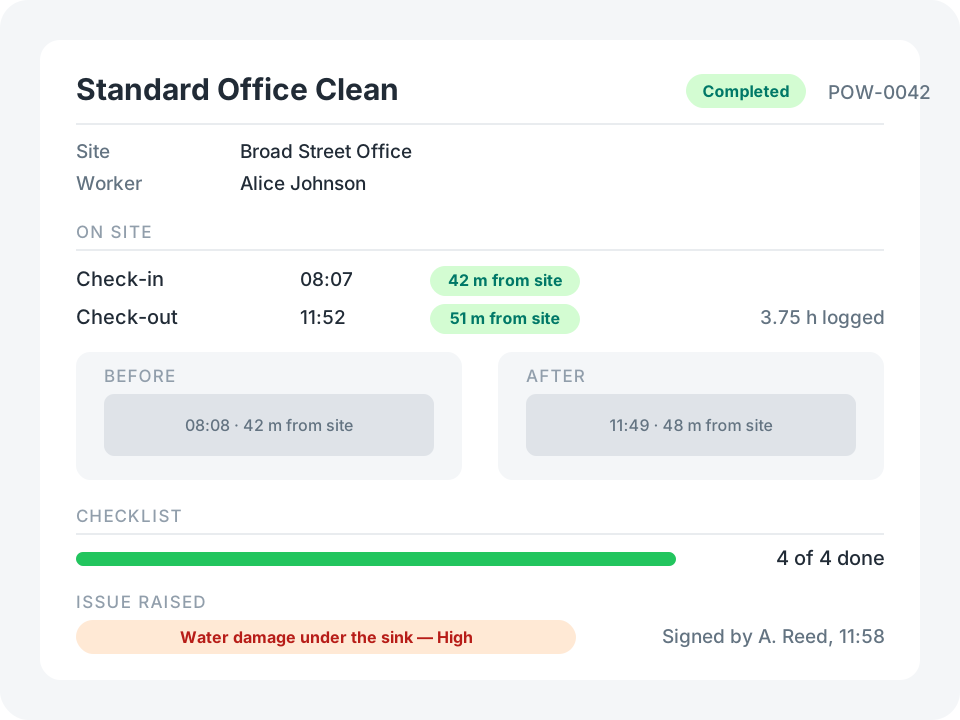
Every visit becomes one structured record:
08:00
Scheduled
08:07
GPS check-in, 42 m from site
08:08
Before photo
09:20
Steps ticked off, with photos
09:47
Issue raised, supervisor assigned
11:49
After photo
11:52
GPS check-out
11:58
Customer signs on site
11:59
Report emailed to the customer
Instead of asking "Did the team do the work?"
You can answer "Here's exactly what happened."
See It in Action
Start with the template, then reshape it in plain English — a second signature, a different radius, a text message when a High severity issue is raised. No coding required.
Try for FreeProof that somebody was actually there
Every site carries an address, and every piece of evidence a visit collects is measured against it.
- A GPS check-in on arrival and a check-out on the way out
- A before photo and an after photo, each carrying where it was taken
- Anything landing further than 500 m from the site is flagged — and counted on the dashboard
Result: "were they on site?" stops being a question.
Where the template stops
It is a starting point, not a finished field-service system. These are the edges you are most likely to hit — each one is a change you can ask the assistant for.
A new visit starts with an empty checklist. The job type’s steps are shown as text to copy from — nothing creates the rows for you.
A visit totals its steps and issues when the visit itself is saved. Tick a step and save the visit again to move the progress figure.
Deleting a visit deletes its steps and issues with it. That is what makes them belong to it — and what makes deleting one a decision.
The Issues screen lists every issue in the app, but an issue does not name the visit it came from. Open it from the visit for that context.
The GPS stamps prove where. The start and end times are entered by the worker, not stamped by the clock.
The report is regenerated in place, so there is no archive of the exact file a customer received last month.
One flat 500 m radius per field, and an inactive crew member is still offered when you assign a visit — both are a sentence to the assistant away.